Build production-ready admin products — not just dashboards
A working React admin foundation with real workflows, RBAC, advanced data UX, and a strict architecture.
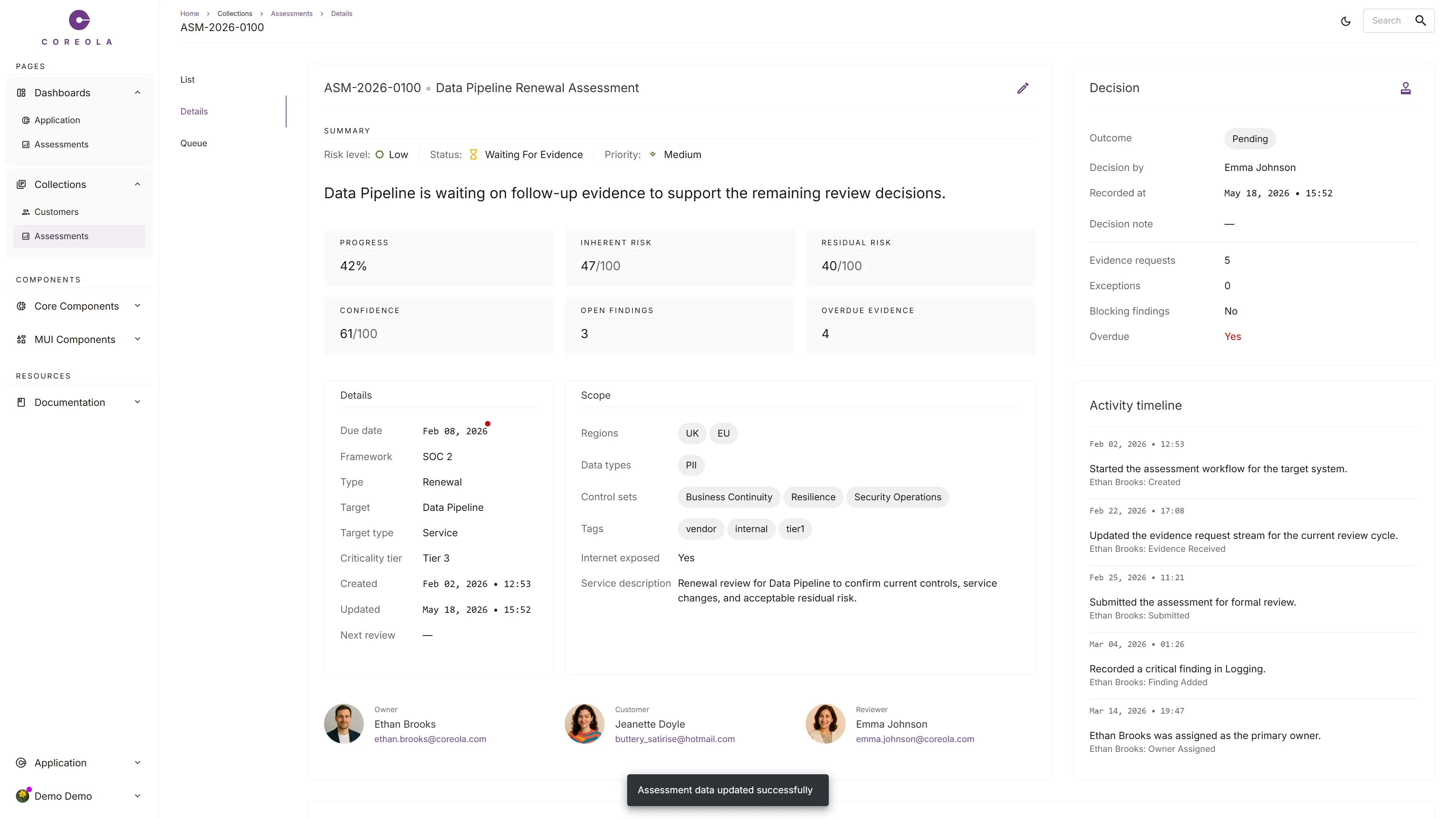
A runnable, opinionated codebase built on React 19, TypeScript, Vite, Redux Toolkit + RTK Query, and MUI 9 — with auth, CASL-based permissions, feature flags, server-driven tables, dashboards, notifications, theming, i18n, a mock backend, and a fully built workflow module.
Positioning
The closest analogue is a reference application.
A complete, opinionated codebase that you fork and shape into your product.
- UI kit
- Starter template
- Low-code platform
- Production backend
It's a working admin product — you start your product by changing what it brings.
The floor problem
Most admin products waste months on the same foundation work.
And worse — every team rebuilds them differently. Tables behave differently. Permissions sprawl. The product gets less coherent with every new module.
-
Authentication
Session persistence, silent token refresh, refresh-safe auth state.
-
Permissions
Roles, abilities, and route-level access control with an editable surface.
-
Data tables
Server pagination, sort, filter, search, column reorder, resize, visibility, CSV export.
-
Dashboards & forms
Detail pages, dialogs, notifications, and a coherent layout system.
-
Feature flags
Route- and component-level gating plus an admin UI to manage them.
-
State & routing
State management, API wiring, and a route tree that drives navigation.
-
Design system
Color tokens, type scale, density rules, and component variants tuned for admin UI.
-
Theming & i18n
Light/dark, multi-language, and persistence of user preferences.
None of this is your competitive advantage. And without one shared system, every new module pushes the product further from coherent.
These can be replicated, but doing so well takes months. Coreola gives those months back.
What Coreola is
A working admin product foundation for operational software.
Coreola is built for products where work moves through statuses, people act under permissions, records branch into detail flows, and teams operate through queues, decisions, and evidence.
Built for teams shipping
- • Internal tools
- • SaaS back offices
- • Compliance and operations platforms
- • Workflow-heavy admin systems
- • Data-rich customer and analyst interfaces
You do not install Coreola as a library and start from zero. You start by changing what Coreola brings.
What you get
Real modules. Real patterns. A real architecture.
Coreola ships the whole foundation as a working app, organized into four chapters: the modules you adapt, the patterns they're built on, the capabilities they ride, and the engineering decisions underneath.
Real modules, not gallery examples.
Seven working modules ship in the box. Each one is a reference you can copy, fork, or adapt.
-
Assessments
Canonical workflow module: list, queue, details, and dashboard built on real entities (statuses, findings, evidence, decisions).
-
Dashboards
Application and Assessments reference dashboards on a fixed four-zone layout — KPIs, charts, side card, timeline.
-
Customers
Demonstrates client-side and server-side table strategies side-by-side, plus saved filters (Segments).
-
Accounts
Editable RBAC surface for users, roles, and abilities — each as a CRUD resource.
-
Settings
General preferences (language, theme, sidebar style) and a Feature Flags admin UI.
-
Profile
Per-user profile page: name, avatar, email, password change. Built on the same form patterns as the rest of the app.
-
Auth
Sign in, sign up, and password recovery flows with real session handling and silent token refresh.
The patterns that make operational software usable.
Configured by props, not custom-rendered per page. One canonical answer for every recurring UI need.
-
Tables
Server pagination, sort, filter, search, column reorder, resize, visibility, CSV export, URL state.
-
Filters
Declarative, persistent vs. opt-in, URL- and server-aware serialization.
-
Global search
Command-palette header search with live suggestions, full results, useful links, and keyboard navigation — backed by the mock backend.
-
Forms
react-hook-form + yup as the one canonical pattern, with server-error mapping.
-
Empty, loading, error states
One way to render each, consistently across every page and module.
-
Notifications
Global snackbar system accessible from non-React code, with success/error patterns.
The parts serious admin products always need.
Already wired in — auth bootstraps, permissions gate routes, theme persists, notifications fire.
-
Authentication & sessions
Bearer auth with silent token refresh and persistence across reloads.
-
CASL permissions
Ability matrix used at navigation, route, and component levels — editable from the admin UI.
-
Feature flags
Route- and component-level gating with an admin UI for editing.
-
Navigation system
Sidebar, breadcrumbs, and route tree all driven from a single config file.
-
Snackbar & notifications
Global feedback system reachable from baseQuery, slices, and any non-React code.
-
Design system
Tokens, type scale, density rules, and component conventions layered on top of MUI 9.
-
Dark / light theming
Runtime switch with no flash, persisted per user. Token-driven, not literal-driven.
-
Internationalization
i18next with HTTP and localStorage chained backends. Namespaces per feature area.
-
Redux-persist
Auth survives reload. Theme and language survive logout. Tables remember user state.
The conventions that keep a codebase scalable.
Opinionated by design — new features follow the same structure instead of inventing their own.
-
React 19 + TypeScript + Vite
Strict types, fast dev server, modern ES module-native toolchain.
-
Redux Toolkit + RTK Query
One store. One slice per backend resource. Tag-based cache invalidation.
-
MUI 9 design surface
Theming, density, dark mode, accessibility — solved out of the box.
-
Components collection
Reusable components for the recurring needs — Card, Table, DataList, ConfirmDialog, Status, EditImage, and more.
-
Forms
react-hook-form + yup as the canonical form stack, with server-error mapping via useFieldsFromError.
-
MVVM page convention
View + model hook + per-page hooks + types, scaffolded by a Plop generator.
-
Single routes.ts
Drives routing, sidebar nav, breadcrumbs, ability filtering, and feature flags from one source.
-
Two-target API layer
Any feature can run on the mock while the rest of the app hits the real API.
-
Storybook
Every component in the design system has a story, ready for use as documentation.
-
Linting & quality
ESLint, Prettier, Husky, lint-staged, and circular-import detection (madge).
Workflow proof
Built around real workflows, not gallery demos.
Most admin templates look good until the second real screen. Coreola ships two working modules — Assessments for workflow depth and Customers for data-management breadth — so every pattern has been tested against real product complexity.
Assessments
collections/assessments/listSurfaced through a server-paginated list and an operator queue — each with filters, sorting, search, and column customization. Per-row action menus gate actions by the signed-in user's CASL abilities.
From draft → intake → review → evidence → remediation → decision → archived. Transitions are state-driven — the backend tells the UI which moves are valid from where.
Findings
collections/assessments/details4 severities · 8 categories
Each finding is a mini-workflow with its own owner, severity, category, due date, recommendation, and resolution path.
Evidence Requests
collections/assessments/detailsExternal recipients
Requests go to external recipients (not just internal users), track three time dimensions, and accept file attachments.
Each of these resources has its own full CRUD flow — list, create, update, delete — wired into the same Table, dialog, and notification patterns the rest of Coreola uses.
And a second working module — Customers
collections/customers/listWhere Assessments shows workflow depth, Customers shows data-management breadth — the patterns admin products need when the work isn't a workflow.
- • Two table strategies side-by-side — client-side for in-memory data, server-side for production scale
- • Saved Segments — named filter sets as a reusable "audiences" concept
- • Per-customer activity logs — expandable timeline rows in the list view
- • Edit / observe modes — detail pages with explicit edit vs. read views
Tested against real product complexity:
-
State machines, not flat statuses
Next valid transitions depend on the current state — the backend tells the UI which moves are allowed.
-
Sub-resources with their own CRUD
Findings and Evidence Requests are each full CRUD resources hanging off the parent assessment.
-
One permission system across both collections
Same CASL ability matrix gates Assessments (read / update / decide), Customers (create / read / update / delete), and Segments. Per-record roles — Owner, Reviewer, Relationship Owner — layer on top.
-
Queue view vs. list view
Operators get a focused worklist; managers see the full catalog. Coreola ships both.
-
A decision flow that's its own dimension
Approve, approve-with-conditions, reject, escalate — the decision is separate from status.
-
A summary dashboard on the same data
KPIs, charts, and recent activity read from the same model the queue reads from.
If a pattern works for assessments and customers, it works for tickets, applications, claims, audits, reviews — and most other admin domains. Coreola is designed to survive contact with reality.
Why teams choose Coreola
Five reasons engineering teams pick Coreola.
-
0.1
Ship the first real version faster
Skip months of rebuilding the same admin infrastructure. Plop generators scaffold a full MVVM page in 30 seconds. Even one saved month can be worth more than the license.
-
0.2
Keep the product consistent
Tables, forms, detail pages, notifications, and states follow one system. One canonical answer per recurring UI need — designers and engineers stop relitigating the same decisions.
-
0.3
Reduce architectural drift
The codebase is opinionated by design, so new features follow the same structure instead of inventing their own. The convention survives team turnover.
-
0.4
Move frontend ahead of backend
The two-target API layer (SYSTEM_API / MOCKUP_API) lets a feature run on the mock while the rest of the app hits production endpoints. Frontend teams can build real flows before the final backend is ready.
-
0.5
Build for scale from day one
Coreola assumes production realities — server-driven data, persistent user preferences, CASL permissions, feature flags, and workflow complexity — so you're not rewriting at scale-up.
Philosophy
Opinionated on purpose.
Coreola is built on four principles. Each one exists because admin products have failure modes — these are the ones we've chosen to design against.
-
First
Structure over freedom
A strong convention saves more time than a flexible API. Coreola hard-codes how a page is shaped — view, model hook, types — because every team without a convention invents a worse one anyway.
New engineers find features where they expect them. Onboarding is measured in days, not weeks.
-
Second
Consistency over customization
A calm, repeatable product is faster to build and easier to use. One spacing scale, one type scale, one way to show empty, loading, and error states.
Operators learn one product, not eleven. Designers and engineers stop relitigating the same patterns.
-
Third
Real workflows over demos
Patterns should survive real operational complexity — statuses, sub-resources, queue vs. list views, decision flows. If they work for assessments, they work for tickets, claims, and audits.
Your patterns survive the second module. And the tenth.
-
Fourth
Speed without shortcuts
The same decisions that make teams faster also make the product cleaner long term. Plop scaffolds a page in 30 seconds; the MVVM convention keeps it maintainable in six months.
Sprint velocity stays high after the first few modules — the moment most starter projects start to slow down.
If two engineers can solve the same problem in five different ways, they will. Coreola picks one clear way and makes it repeatable.
Developer experience
Build features, not infrastructure.
Coreola gives engineers a predictable development model. New features follow the same convention — and the convention is machine-enforced where it matters.
$ npx plop mvvm-component
? Component name › Tickets
? Base path › src/features/collections
✔ add tickets/Tickets.tsx
✔ add tickets/tickets.types.ts
✔ add tickets/tickets.styled.ts
✔ add tickets/hooks/useTicketsModel.ts
✔ add tickets/views/TicketsView.tsx
› Done in 30s.
-
MVVM page convention
New engineers find features where they expect them. Pages have the same shape every time — onboarding becomes the codebase, not a wiki.
-
One routes.ts drives everything
Add a route once and navigation, breadcrumbs, and access control update with it. No drift between files as the product grows.
-
CASL ability matrix
Permissions are real checks at view, action, and column level — and admins manage them from the UI, not by code change.
-
RTK Query, standardized
Every API resource follows the same shape. Caching, refetching, and invalidation are solved problems instead of per-feature decisions.
-
Presentational view components
Business logic stays in model hooks; views stay readable. Pages don't decay as feature complexity grows.
-
Storybook coverage
Every component is documented and ready to fork. New features start from working examples — no code archaeology.
Not just convenient. It's what keeps product speed from collapsing after the first few modules.
Comparison
The gap between UI kits and real products.
Coreola sits between component libraries and the admin product you're actually building. Nine capabilities side-by-side.
| Capability | COREOLA | UI Kit | Starter Template |
|---|---|---|---|
| Working app foundation | — | Partial | |
| Real workflow module | — | — | |
| CASL-based RBAC with admin UI | — | Partial | |
| Server-driven tables | — | Partial | |
| Feature flags | — | Rare | |
| Route + permission model from one config | — | Rare | |
| Mock backend with two-target API layer | — | Rare | |
| Storybook with full component coverage | Sometimes | Rare | |
| Documented conventions | — | Rare | |
Coreola is the missing middle between component libraries and a real admin product.
Who it is for
Coreola fits some products. And not others.
Three honest columns. Naming the fits and the non-fits saves you the discovery later.
A fit when
Your product has —
- Operational workflows with states and transitions
- Role-based access control
- Data-heavy screens with filters, sort, and search
- Queues, detail pages, and stateful actions
- Actions that depend on state, permissions, and ownership
Assumes
Your team is okay with —
- Redux Toolkit + RTK Query for state and data
- MUI 9 as the primary UI surface
- The MVVM page convention
- Config-driven routing from routes.ts
- CASL for permissions
- Vite + TypeScript + React 19
Not a fit when
You need —
- A marketing website
- A content portal
- A low-code builder
- A non-React stack
- A radically non-MUI visual language
Who's behind this
Built by people who kept rebuilding it.
We're frontend engineers who spent years building admin products — back offices, internal tools, operations platforms.
Every project started the same way: auth, permissions, tables, theming, a mock backend so frontend wasn't blocked. Months of foundation work before the first real feature. After one rebuild too many, we stopped and built the foundation once — properly, with the conventions we wished every codebase we'd inherited had.
Coreola is that foundation. It's the codebase we'd want handed to us on day one of a new admin product.
— the Coreola team
We didn't build a template to sell. We built the codebase we kept being asked to rebuild — and then made it sellable.
FAQ
The questions buyers actually ask.
Short answers, no fine print. The long versions live in the License and Terms.
What exactly do I get after purchase?
Access to the private Coreola GitHub repository — the full source code, all 7 modules, the mock backend, Storybook, and the documentation. You send your GitHub username, we add you as a collaborator. You own what you download, forever.
Do I need a specific backend?
No. Coreola is a frontend foundation. It ships with a working mock backend (json-server) and a two-target API layer, so you point each feature at your real REST API whenever it's ready — per feature, not all at once.
What happens after the 12 months of updates?
Nothing breaks. Your downloaded versions keep working and remain licensed forever. New updates after 12 months require a renewal, offered to existing license holders at a discount.
Can I use Coreola in client projects?
Yes — commercial use, unlimited projects, including work delivered to clients. The only hard limits: you can't resell or redistribute Coreola itself as a template, starter kit, or boilerplate, and you can't publish the source in a public repo.
What's the difference between Personal and Team?
Personal covers one named developer. Team covers up to ten named developers at one company. Same product, same code. More than ten seats — email us for an enterprise license.
Is there a subscription?
No. One-time payment. The license to use downloaded versions is perpetual; only update access is time-boxed (12 months).
Can I get a VAT invoice / buy as a company?
Yes. Checkout is handled by Creem as merchant of record — it handles invoicing and tax compliance (EU VAT, UK VAT, US sales tax, and equivalents) automatically.
What if it doesn't fit my stack?
The core assumptions are React 19 + TypeScript + Vite, MUI 9, Redux Toolkit + RTK Query, and CASL. Everything else — charts, forms, date handling, i18n, individual components — is replaceable with whatever you prefer; you own the code. And even if the core conflicts with your stack, Coreola still works as a reference: the architecture, conventions, and component patterns transfer to any React codebase. If neither fits, evaluate in the live demo before buying — digital sales are final.
How is this different from an admin template?
Templates give you screens; Coreola gives you a working product to change: real workflow modules with state machines, an editable CASL permission matrix, server-driven tables, feature flags, and one enforced convention for every recurring decision. The closest analogue is a reference application.
What languages does it ship in?
English and Ukrainian out of the box. i18next with per-feature namespaces — adding a language is filling in translation files, not rearchitecting.
What support is included?
Email support for installation and setup, best-effort. It doesn't cover custom development or app-specific debugging — the docs and in-app documentation cover the architecture in depth.
Pricing
One purchase. Own the code.
Skip the months. Adopt the foundation and start building your product — at a price that can pay back inside the first sprint.
Coreola · Personal
For solo developers and small projects.
One-time payment · No subscription · Includes 12 months of GitHub access, updates, and the right to use downloaded versions forever.
First 100 buyers — apply
FIRST100
at checkout to save $50.
GitHub access after purchase. Evaluate Coreola in the live demo before purchase. Digital-product sales are final.
What's included
- Full Coreola codebase — yours to own, fork, and modify
- All 7 modules: Assessments, Dashboards, Customers, Accounts, Settings, Profile, Auth
- UI patterns, engineering conventions, and Storybook coverage
- Comprehensive documentation
License terms
- One developer
- Commercial use
- Unlimited projects
- 12 months of updates
- Setup email support
Coreola · Team
Same product, multi-seat — covers up to 10 developers at one company.
One-time payment · No subscription · Includes 12 months of GitHub access, updates, and the right to use downloaded versions forever.
First 100 teams — apply
TEAM100
at checkout to save $100.
GitHub access after purchase. Evaluate Coreola in the live demo before purchase. Digital-product sales are final.
What's included
- Full Coreola codebase — yours to own, fork, and modify
- All 7 modules: Assessments, Dashboards, Customers, Accounts, Settings, Profile, Auth
- UI patterns, engineering conventions, and Storybook coverage
- Comprehensive documentation
License terms
- Up to 10 developers
- One company
- Commercial use
- Unlimited projects
- 12 months of updates
- Setup email support
Need more than 10 seats? Get in touch for an enterprise license →
Stop rebuilding admin products from scratch.
Start with a working foundation — workflows, permissions, data UX, and architecture, included.
Want the long version? Explore the documentation →